Cindigo 2.0.X progress

Announcements, requests and support regarding the Cinema 4D exporter
User avatar
fused
Developer
Posts: 3648
Joined: Fri Sep 22, 2006 7:19 am
Location: Berlin, Germany
3D Software: Cinema 4D

Cindigo 2.0.X progress

Post by fused » Mon May 04, 2009 9:10 am

Hey all,

im working on the new Cindigo and while Cindigo 1.1.18 RC4 should work just fine with indigo 2.0 i feel that there is still lots room for improvement.

ill share the new stuff im working on here.

ive been working a bit on motion blur:
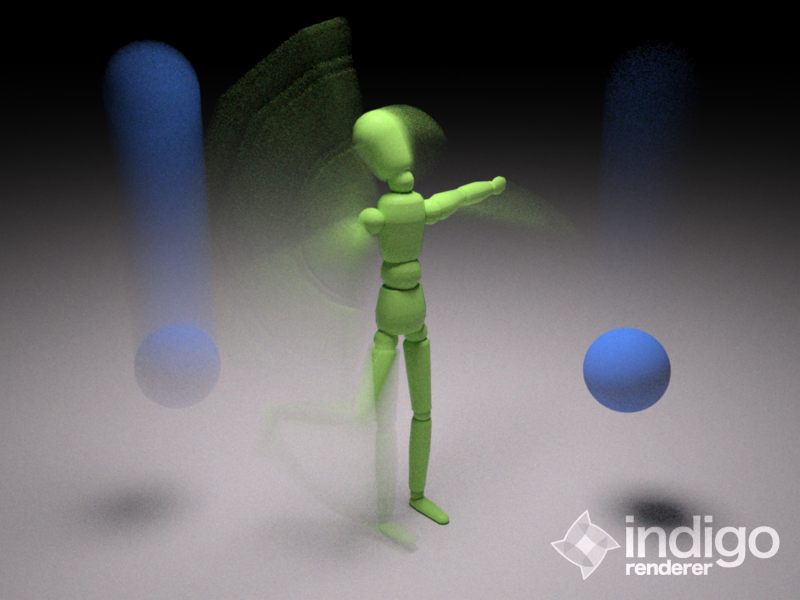
Image

the old export routine works well in most cases, but there are some shortcomings:
- instances tend to get not exported correctly
- deformers arent working at all
- the way im doing it is horribly complicated

so i tried something different. its not perfect yet and i broke lots of things, amongst them:
- animation export
- material association to meshes
- motion blur
- material / setting seperation (will be removed anyway, it does not fit in what im planning to do)

fun with deformers:
fun_with_deformers.jpg
fun_with_deformers.jpg (188.22 KiB) Viewed 7169 times
i also moved the render settings object to the c4d render settings dialog (made it a video post plugin).

User avatar
fused
Developer
Posts: 3648
Joined: Fri Sep 22, 2006 7:19 am
Location: Berlin, Germany
3D Software: Cinema 4D

Re: Cindigo 2.0.X progress

Post by fused » Mon May 04, 2009 1:15 pm

some more progress...

- materials on meshes are being detected fine now
- i decided not to export c4d instances as instances in indigo anymore, because they arent even instances and by that you can use them to the fullest (the can be deformed, have different uvs, etc). use the indigo instance object instead
- material export is back
- code is much easier to read and understand now
- cindigo is usable again after breaking it completely :mrgreen:

User avatar
CTZn
Posts: 7240
Joined: Thu Nov 16, 2006 4:34 pm
Location: Paris, France

Re: Cindigo 2.0.X progress

Post by CTZn » Mon May 04, 2009 3:46 pm

Oh, Indigo 2 added motion blur...

Fun stuff fused :)
obsolete asset

User avatar
PureSpider
Posts: 1459
Joined: Tue Apr 08, 2008 9:37 am
Location: Karlsruhe, BW, Germany
Contact:

Re: Cindigo 2.0.X progress

Post by PureSpider » Tue May 05, 2009 12:25 am

Post some screens of the new settings and whats changed in general please :)

User avatar
pixie
Indigo 100
Posts: 2346
Joined: Sat Dec 29, 2007 4:54 am
Location: Away from paradise
3D Software: Cinema 4D
Contact:

Re: Cindigo 2.0.X progress

Post by pixie » Tue May 05, 2009 1:08 am

PureSpider wrote:Post some screens of the new settings and whats changed in general please :)
Pretty please with sugar on top! =)

User avatar
fused
Developer
Posts: 3648
Joined: Fri Sep 22, 2006 7:19 am
Location: Berlin, Germany
3D Software: Cinema 4D

Re: Cindigo 2.0.X progress

Post by fused » Tue May 05, 2009 2:25 am

pixie wrote:
PureSpider wrote:Post some screens of the new settings and whats changed in general please :)
Pretty please with sugar on top! =)
for now, visaully nothing has changed, the render settings look the same, they're just in a different place.

only internal changes for now - im going deep tho ;)

User avatar
zeitmeister
2nd Place 100
Posts: 2010
Joined: Tue Apr 22, 2008 4:11 am
Location: Limburg/Lahn, Germany
Contact:

Re: Cindigo 2.0.X progress

Post by zeitmeister » Tue May 05, 2009 7:38 am

This looks great, fused!

Maybe you could think about an instance conversion? Like the material conversion?
I think that could make things easier...

User avatar
fused
Developer
Posts: 3648
Joined: Fri Sep 22, 2006 7:19 am
Location: Berlin, Germany
3D Software: Cinema 4D

Re: Cindigo 2.0.X progress

Post by fused » Tue May 05, 2009 8:20 am

zeitmeister wrote:This looks great, fused!

Maybe you could think about an instance conversion? Like the material conversion?
I think that could make things easier...
... hm.

the cindigo instance object isnt allowed to be nested(you know... instance inside instance) while c4d instances are... that would not work out well. maybe, when i get the nested stuff working :)

User avatar
zeitmeister
2nd Place 100
Posts: 2010
Joined: Tue Apr 22, 2008 4:11 am
Location: Limburg/Lahn, Germany
Contact:

Re: Cindigo 2.0.X progress

Post by zeitmeister » Tue May 05, 2009 8:28 am

Oh, this is hard then.

I personally love nested instances and work with them as often as possible...
but I think when it's getting over to Indigo, collapsing and converting all of my objects is not the big problem.

Although it would be really nice to avoid this step... :-)

User avatar
fused
Developer
Posts: 3648
Joined: Fri Sep 22, 2006 7:19 am
Location: Berlin, Germany
3D Software: Cinema 4D

Re: Cindigo 2.0.X progress

Post by fused » Tue May 05, 2009 8:34 am

zeitmeister wrote:Oh, this is hard then.

I personally love nested instances and work with them as often as possible...
but I think when it's getting over to Indigo, collapsing and converting all of my objects is not the big problem.

Although it would be really nice to avoid this step... :-)
You will not have to collapse or convert anything, C4D instances are exported just fine, even deformed - just not as instances in Indigo but as meshes. :)

User avatar
pixie
Indigo 100
Posts: 2346
Joined: Sat Dec 29, 2007 4:54 am
Location: Away from paradise
3D Software: Cinema 4D
Contact:

Re: Cindigo 2.0.X progress

Post by pixie » Tue May 05, 2009 9:15 am

fused wrote:
zeitmeister wrote:Oh, this is hard then.

I personally love nested instances and work with them as often as possible...
but I think when it's getting over to Indigo, collapsing and converting all of my objects is not the big problem.

Although it would be really nice to avoid this step... :-)
You will not have to collapse or convert anything, C4D instances are exported just fine, even deformed - just not as instances in Indigo but as meshes. :)
But they take a lot of time when in meshes... :(

User avatar
fused
Developer
Posts: 3648
Joined: Fri Sep 22, 2006 7:19 am
Location: Berlin, Germany
3D Software: Cinema 4D

Re: Cindigo 2.0.X progress

Post by fused » Tue May 05, 2009 11:04 am

ive been working on some stuff today that was actually promised for the 1.1 stable.

im converting c4d lights now. area lights at least. they get exported as meshes with emitting materials (with the rgb color from the light object or, if a light tag is applied, with the settings from this).

i might also implement spot lights with a default IES, but i will have to export a small plane for it.

point lights, directional lights and the sqare spot will not be possible (are there sqare IES profiles? if yes, are they supported by indigo? if yes, i might add that too) and not be implemented.

User avatar
Zom-B
1st Place 100
Posts: 4701
Joined: Tue Jul 04, 2006 4:18 pm
Location: ´'`\_(ò_Ó)_/´'`
Contact:

Re: Cindigo 2.0.X progress

Post by Zom-B » Tue May 05, 2009 4:51 pm

This sounds really great Yves!
fused wrote:i might also implement spot lights with a default IES, but i will have to export a small plane for it.
Hmmm.... how about not exporting just as "default" IES, but directly convert the spotlight to a fitting IES!
Since IES files are only renamed text files, with some "few" values and numbers it should be quite easy to generate some Spotlights by playing arround with IES Generator...

Some more infos about IES can be found here

Here you can find the File Format... and here some more explanations
polygonmanufaktur.de

User avatar
fused
Developer
Posts: 3648
Joined: Fri Sep 22, 2006 7:19 am
Location: Berlin, Germany
3D Software: Cinema 4D

Re: Cindigo 2.0.X progress

Post by fused » Tue May 05, 2009 5:55 pm

ZomB wrote:This sounds really great Yves!
fused wrote:i might also implement spot lights with a default IES, but i will have to export a small plane for it.
Hmmm.... how about not exporting just as "default" IES, but directly convert the spotlight to a fitting IES!
Since IES files are only renamed text files, with some "few" values and numbers it should be quite easy to generate some Spotlights by playing arround with IES Generator...

Some more infos about IES can be found here

Here you can find the File Format... and here some more explanations
sounds like a nice idea, will look into that. but until then im just using the a default.ies :)

oh and btw: i added onmi lights as emitting spheres of 1cm in diameter. not really recommended to use tho :)

User avatar
zeitmeister
2nd Place 100
Posts: 2010
Joined: Tue Apr 22, 2008 4:11 am
Location: Limburg/Lahn, Germany
Contact:

Re: Cindigo 2.0.X progress

Post by zeitmeister » Tue May 05, 2009 8:00 pm

oh and btw: i added onmi lights as emitting spheres of 1cm in diameter. not really recommended to use tho
ROFL! A nice scene, with 6 to 7 omnis as fill-lights, HDRI and sunsky... :D

Post Reply
35 posts