Page 1 of 1
Sunlit scene via XML
Posted: Sat Jan 20, 2007 6:50 am
by rizzo
As a new user to Indigo, I'm trying to figure things out by reading the various tutorials and examples provided. I'm having a great deal of trouble trying to achieve a sunlit scene. By sunlit I am referring to a bright sunny day at about early afternoon. For some reason my images come out drastically under lit and while the shadows are nice and hard the scene isn't lit to that effect.
Is there anyone out there that has xml of a sunlit (as described above) scene that might be able to help? I would appreciate any help.
Posted: Sat Jan 20, 2007 7:08 am
by CTZn
I think your issue comes with the use of the tonemapping system. It "averages" the overall intensity of the image so you don't get burned out image. Try setting higher pre-scale (3-5).
Posted: Sat Jan 20, 2007 7:08 am
by Phil
Hi rizzo,
welcome here

Do you mean that you dont use a modeller, that you create your scenes in xml directly from hand


Could you be more precise, which tutorial, which example?
Regards, Phil
Posted: Sat Jan 20, 2007 7:10 am
by manitwo
thats an tonemapping issue

try to experiment with postscale and/or burn:
Code: Select all
    <tonemapping>
        <reinhard>
            <pre_scale>1</pre_scale>
            <post_scale>2</post_scale>
            <burn>4</burn>
        </reinhard>
    </tonemapping>
Posted: Sat Jan 20, 2007 7:14 am
by CTZn
What's the real difference in result with tweaking pre or post scale ?
Beware rizzo, if you are not using Indigo 0.7t1 or above, burn must be under 1. Try then 0.6 or lower.
Posted: Sat Jan 20, 2007 7:40 am
by manitwo
What's the real difference in result with tweaking pre or post scale ?
As far as i know prescale controlls the brightness of midtones and postscale mapps the brighter pixels to pure white. (don't know how i could write what i mean - damn english
)
Beware rizzo, if you are not using Indigo 0.7t1 or above, burn must be under 1. Try then 0.6 or lower.
Oh sorry, ctzn is right, with indigo <0.7 the burn should be under 1
Posted: Sat Jan 20, 2007 8:12 am
by CTZn
don't know how i could write what i mean
I undestand, that helps anyhow
I should have precised:
Try then 0.6 or lower for burn
because it can be confusing regarding if we talk about Indigo or burn parameter.
Posted: Sat Jan 20, 2007 10:12 am
by manitwo
Posted: Sat Jan 20, 2007 11:48 am
by CTZn
Thank you manitwo, I never did such test

Now I'm sure I was using that correctly
Posted: Sat Jan 20, 2007 5:33 pm
by rizzo
Hi everyone and thank you for the responses! I am using Blender to model my scene. I am using the Version 6 Beta 3 export script with Indigo 0.6.
The tutorial for this says that I can just put a sunlight lamp in my scene and I turn the Env Type to SunSky. I do this yet it comes out dark and with bluish tint. I tried the examples above, but none have worked.
Is there anyone who might have an example of a great sun lit scene (early afternoon, bright, blue, sunny SunSky) so that I may look through the XML and see if I may find my problem?
I'm lost, but hopping you fellows might be able to help me
Thank you
Posted: Sat Jan 20, 2007 8:28 pm
by Phil
Hi,
I hope this helps:
Code: Select all
<?xml version="1.0" encoding="utf-8"?>

<scene>
	<renderer_settings>
		<width>800</width>
		<height>600</height>
		<metropolis>true</metropolis>
		<large_mutation_prob>0.1</large_mutation_prob>
		<max_change>0.02</max_change>
		<max_num_consec_rejections>100</max_num_consec_rejections>
		<bidirectional>false</bidirectional>
		<russian_roulette_live_prob>0.7</russian_roulette_live_prob>
		<max_depth>1000</max_depth>
		<strata_width>14</strata_width>
		<logging>false</logging>
		<save_untonemapped_exr>false</save_untonemapped_exr>
		<save_tonemapped_exr>false</save_tonemapped_exr>
		<halt_time>-60</halt_time>
		<frame_upload_period>20</frame_upload_period>
		<image_save_period>20</image_save_period>
	</renderer_settings>

	<tonemapping>
		<linear>
			<scale>0.000800</scale>
		</linear>
	</tonemapping>

	<tonemapping>
		<reinhard>
			<pre_scale>1.000000</pre_scale>
			<post_scale>3.000000</post_scale>
			<burn>0.800</burn>
		</reinhard>
	</tonemapping>

	<skylight>
		<sundir>-0.000000 -0.010154 0.999949</sundir>
		<turbidity>2.000000</turbidity>
		<sky_gain>0.005000</sky_gain>
	</skylight>

	<camera>
		<pos>6.910276 -6.507640 1.379397</pos>
		<up>-0.004638 0.017713 0.999832</up>
		<forwards>-0.724549 0.689047 -0.015568</forwards>
		<aperture_radius>0.017500</aperture_radius>
		<focus_distance>2.000000</focus_distance>
		<aspect_ratio>1.33333</aspect_ratio>
		<sensor_width>0.035000</sensor_width>
		<lens_sensor_dist>0.038281</lens_sensor_dist>
		<white_balance>E</white_balance>
	</camera>

	<material>
		<name>Default</name>
		<diffuse>
			<colour>1 1 1</colour>
		</diffuse>
	</material>
	<material>
		<name>Au.nk</name>
		<phong>
			<nk_data>nkdata/Au.nk</nk_data>
			<exponent>500.000</exponent>
		</phong>
	</material>

	<include>
		<pathname>geom_test_sunlight.xml</pathname>
	</include>

	<plane>
		<normal>0 0 1</normal>
		<dist>-0.000001</dist>
		<material_name>Default</material_name>
	</plane>

	<!-- Cube -->
	<model>
		<pos>0.000000 0.000000 0.000000</pos>
		<scale>1.0</scale>
		<rotation>
			<matrix>
				1.000000 0.000000 0.000000 0.000000 1.000000 0.000000 0.000000 0.000000 1.000000
			</matrix>
		</rotation>
		<mesh_name>Cube</mesh_name>
	</model>

</scene>
It seems that the exporter writes tonemapping twice, but I choose reinhard in the gui.
Regards, Phil
Posted: Sun Jan 21, 2007 7:27 am
by rizzo
I tried the settings you posted above, but the image is still dull. I guess as a new user I'm hesitant to try new things. Maybe I should change some settings to large numbers or very small to see a difference?
Phil, Thank you for xml settings.
Posted: Mon Feb 05, 2007 4:01 am
by kwistenbiebel
Hi all,
I am experiencing the same issue as Rizzo.
I can't manage to simulate a sun-lit space.
The indigo version i use is 0.6 through the new sketchup exporter.
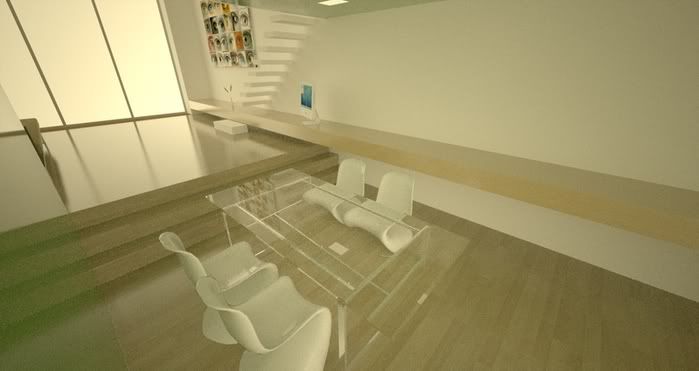
This is an early try out with meshlight (blackbody light assigned) in window surfaces.
Someone can give me a hint on using the sky and bright sunlight to lit this scene?
It is turning blue when using sky/sun.
Thanks
Mesh light version:
Posted: Mon Feb 05, 2007 9:01 am
by Kram1032
hmmm... blueish tint?
Sounds, as if you did NOT used "SunSky", but "Background lighting" with default blender sky colour settings... Check, if you REALLY have choosen "SunSky" in the drop down menu....
If so and the mistake is there, nevertheless, then make the sky black....
If this doesn't work either, post a bug^^
Posted: Mon Feb 05, 2007 10:21 am
by kwistenbiebel
Thanks Kram,
but i am using sketchup.
I am pretty sure i checked the sun/sky on.
Btw, background colour is white.
Should i remove the glass from the windows to show sunlight?
Or change glass settings?
regards,
kwistenbiebel
