Borgleader's Material Emporium
Posted: Sun Jun 21, 2009 4:45 pm
As an ongoing challenge, I'm trying to create a few materials. Some have been completed are already in the database and others are still WIP so please keep posting your comments and suggestions. Also please report here if any of my materials fail to work.
====================================================================
Materials already in the database:
Safety Glass - by Borgleader:

Safety Glass 2 - by Borgleader:

Scratched Copper - by Borgleader:

Scratched Copper 2 - by Borgleader:

Green Plastic - by Borgleader:

Baby Blue Plastic - by Borgleader:

Wooden Floor - by Godzilla:

Wooden - by Godzilla:

====================================================================
Materials still in WIP:
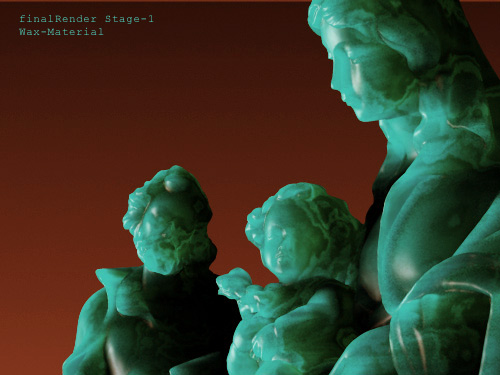
Jade wax material --> Sauce picture
I was thinking of blending two green high exponent phongs using a blend map, but it didn't turn out well. So I'm still working on it (and open to ideas).
Transparent Plastic --> Sauce picture
This one is pretty simple, it's a blend of a white phong with a null.

3. Final Carpaint --> Sauce picture
It's a slightly modified version of the "Fast carpaint" material from the database.

Another carpaint --> Sauce picture
For this one I want to take some more time and examine some of the other carpaints before working on this one, if you have interesting links on the subjects please send them my way
Again another carpaint --> Sauce picture
I adjusted the rgb value of the red carpaint to get this one (and on IOR value as well).

Colored foil --> Sauce picture
Like eulgrand mentionned it's a simple phong material with a high exponent, just change the RGB values to get all the other colors. I turned "Specular Reflectivity" on.

Perforated metal --> Sauce picture
Blend mat of al.nk (phong) and a null using a blend map, and a bump map on the phong. It would probably be better to remake this as a shader to make the size of the holes a variable, but I don't know anything about ISL so...

Gummy bear --> Sauce picture
Tbh doesnt look like gummy bear...at all. So for now I'm letting it be. I'll probably come back to it later. I'm guessing this will be a simply phong mat?
CF Mesh --> Sauce picture
I managed to find a plugin I'd seen a few weeks back in a tutorial. It was used to create a material for a teddy bear, and I thought I might be able to use it here. So far my tests aren't quite conclusive but I still have hope it'll turn out well. The plugin is call r_weave and can be foud here.

Blue foggy plastic --> Sauce picture
This one is a modified version of the "transparent plastic".

====================================================================
Materials already in the database:
Safety Glass - by Borgleader:

Safety Glass 2 - by Borgleader:

Scratched Copper - by Borgleader:

Scratched Copper 2 - by Borgleader:

Green Plastic - by Borgleader:

Baby Blue Plastic - by Borgleader:

Wooden Floor - by Godzilla:

Wooden - by Godzilla:

====================================================================
Materials still in WIP:
Jade wax material --> Sauce picture
I was thinking of blending two green high exponent phongs using a blend map, but it didn't turn out well. So I'm still working on it (and open to ideas).
Transparent Plastic --> Sauce picture
This one is pretty simple, it's a blend of a white phong with a null.
3. Final Carpaint --> Sauce picture
It's a slightly modified version of the "Fast carpaint" material from the database.
Another carpaint --> Sauce picture
For this one I want to take some more time and examine some of the other carpaints before working on this one, if you have interesting links on the subjects please send them my way
Again another carpaint --> Sauce picture
I adjusted the rgb value of the red carpaint to get this one (and on IOR value as well).
Colored foil --> Sauce picture
Like eulgrand mentionned it's a simple phong material with a high exponent, just change the RGB values to get all the other colors. I turned "Specular Reflectivity" on.
Perforated metal --> Sauce picture
Blend mat of al.nk (phong) and a null using a blend map, and a bump map on the phong. It would probably be better to remake this as a shader to make the size of the holes a variable, but I don't know anything about ISL so...
Gummy bear --> Sauce picture
Tbh doesnt look like gummy bear...at all. So for now I'm letting it be. I'll probably come back to it later. I'm guessing this will be a simply phong mat?
CF Mesh --> Sauce picture
I managed to find a plugin I'd seen a few weeks back in a tutorial. It was used to create a material for a teddy bear, and I thought I might be able to use it here. So far my tests aren't quite conclusive but I still have hope it'll turn out well. The plugin is call r_weave and can be foud here.
Blue foggy plastic --> Sauce picture
This one is a modified version of the "transparent plastic".
 It's the first idea that came to me and Indigo didn't shout an error so, I worked with it. Diffuse with transparent specular?